

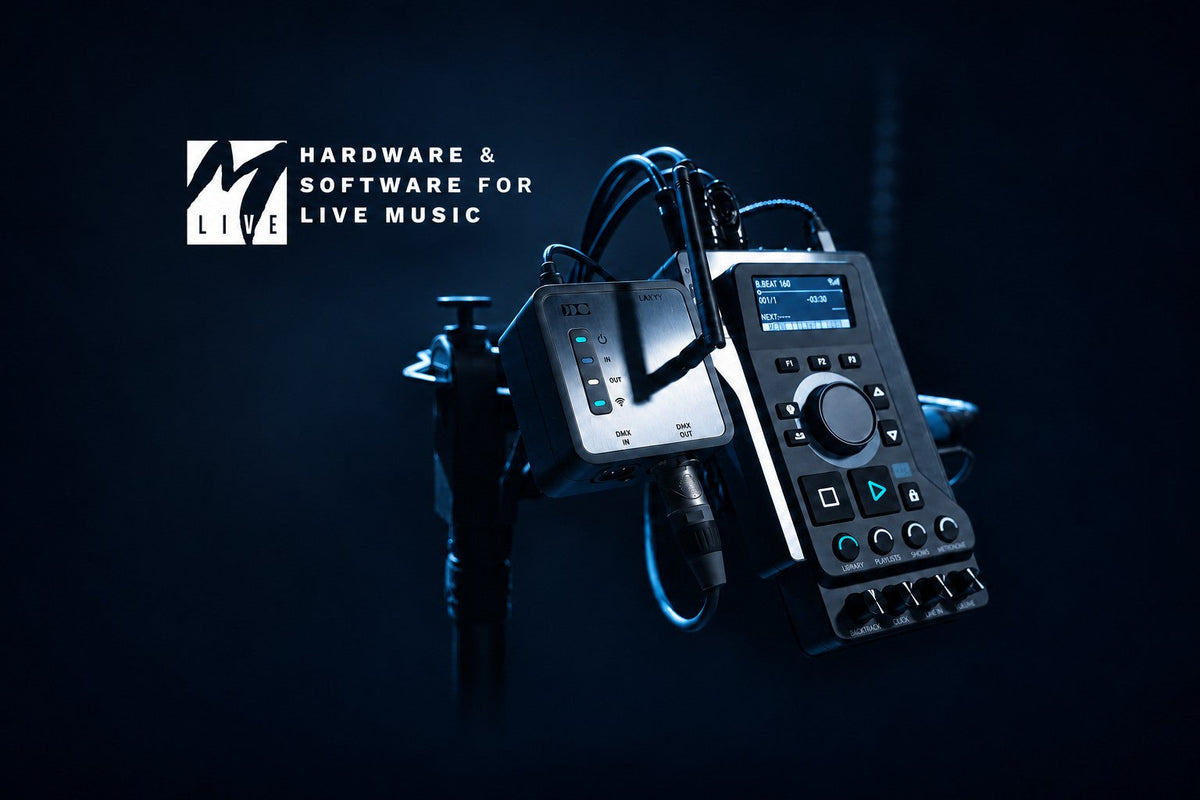
M-Live B.Beat is designed for bands that perform with backing tracks. Prerecorded instruments or backing vocals can be loaded into the player, a separate click sent to the drummer, and video played in sync with the music. Once the show is prepared, the project plays from the hardware itself.
The Italian manufacturer was working in this field long before B.Beat arrived. M-Live was founded in Rimini in 1987, initially producing MIDI backing tracks. The first Merish followed in 1997, and B.Beat launched in 2022. In its company history, M-Live singles out this range as an important step towards professional bands and international markets.
Why B.Beat deserves a closer look
Other standalone multitrack players exist. B.Beat is worth a look because it links audio tracks, video and MIDI equipment control within a prepared show. The band can work from one running order that starts the backing, screen content and programmed preset changes. With LAKYX added, lighting follows the same sequence.
This is particularly relevant when one of the musicians runs playback while performing. They need to see the next song, hear the count-in and start the prepared project reliably. Coordinating these actions while building the set reduces the number of separate things to launch during the show.
What backing tracks add to a live band
A studio recording might contain several keyboard parts, electronic percussion or layered vocals. On stage, some of those parts can play from a recording while the band performs the other instruments live. Prepare the backing around the live arrangement: keep the parts your particular line-up needs and leave room for the musicians on stage.
A single stereo file may be enough for simple accompaniment. Separate tracks give the engineer more control at the mixing desk. If the recorded keyboards are too loud in the room, they can be turned down without changing the backing vocals. A click track helps the musicians stay in time with the recording and needs to feed their monitoring system. It should stay out of the audience mix.
B.Beat: a prepared show in one player

Photo: M-Live.
B.Beat plays up to 16 mono or 8 stereo audio tracks and has six separate audio outputs. Tracks can be grouped and routed around the signals you want to give the sound engineer. A separate headphone mix lets the musician hear the backing, click and a monitor return from the desk.
The front panel has transport buttons, a selection wheel and four knobs for balancing the sources in the headphones. The musician can adjust the click or monitor return during the set. This is particularly useful for a drummer who needs to sort out the headphone mix quickly and start the next song.
B.Beat can also play video over HDMI alongside the audio and send MIDI commands to external equipment. For example, a compatible guitar processor can change preset at a programmed point in the song. The commands and their timing need to be prepared in the project, with the receiving equipment’s MIDI settings checked at rehearsal. The manufacturer’s product page explains the audio, video and MIDI functions.
B.BEAT IN A LIVE SHOW
Running a song with B.Beat
For example, a song begins with a two-bar count-in heard only by the musicians. The keyboard and backing-vocal parts then feed the mixing desk, while synchronized video plays over HDMI. The drummer continues to hear the click and their monitor mix through headphones.
At the chorus, a command prepared in the MIDI track changes the preset on a compatible guitar processor. If LAKYX is connected, the lighting changes to the programmed scene too. These events are timed while preparing the project, so the musician running playback can perform without separately starting the video or manually changing the processor preset.
Preparing the set for a performance

Photo: M-Live.
Prepare the music in your computer’s audio software, then transfer it to the player with B.Beat Manager for Windows and macOS. Export all the individual parts from the same starting point. This keeps every imported track in the right place, even when the backing vocals, for example, only enter at the chorus.
In B.Beat Manager, assign outputs to the tracks, set their levels and arrange the running order. At rehearsal, work through the complete set, checking count-ins, starts, endings and pauses. The finished project stays in the player, so normal playback on stage does not need a computer.
If you use virtual instruments or process live audio in software during the show, a computer may still have an important role in the rig. B.Beat is primarily suited to playing prepared material. It separates the work of building the set from running playback at the gig.
Choosing a B.Beat model for your rig
The compact B.Beat and B.Beat PLUS each have six audio outputs. PLUS adds marker-based looping, track EQ and transposition. Looping is useful when you want to stay on a selected section for longer. Rehearse the particular loop you plan to use with any accompanying video and MIDI actions.

B.Beat PRO16 Plus plays up to 24 mono or 12 stereo tracks, with 16 audio outputs and 12 line inputs. It can record external signals, while two HDMI outputs allow video and lyrics to be displayed separately. Activating the headphone output uses two audio channels, leaving 14 available as separate outputs. Account for this when planning the stage connections.
B.Beat X can work on its own, controlled from a phone or tablet app, or connect over LAN to expand another B.Beat player. It has eight audio outputs; using headphones leaves six available separately. Start by counting the signals you need and deciding who will control playback and how. Storage capacity and additional features come next.
LAKYX: lighting follows the same music

Photo: M-Live.
With LAKYX connected, B.Beat can also play a lighting show synchronized to the song. Define the stage, select the fixtures and assign their DMX addresses in B.Beat Manager. You can then generate lighting from the music or record a show from an external DMX console.
At the gig, LAKYX connects to B.Beat over USB and to the lighting system through its DMX output. The prepared lighting runs with the project. This is useful for a band carrying its own fixtures and wanting to repeat the same show in different venues.
The versions have different show-generation capabilities. LAKYX L offers automatic creation in demo mode, L1 generates up to 128 DMX channels, and L5 and L5W up to 512. L5W also includes CRMX wireless transmission. When the stage changes, adapt the fixture configuration and check the show. The M-Live LAKYX comparison table explains the differences.
A backup playback system with GO.8
For a larger show, two players can be prepared with the same repertoire. GO.8 is an automatic switcher that can transfer eight audio channels, a MIDI line and a video line from the main source to the backup. It monitors a dedicated control signal and selects the other input group when that signal disappears.

Both playback sources need to be prepared and synchronized, and the changeover tested. One GO.8 handles eight audio channels, so a larger system may need several units. The manufacturer’s GO.8 page includes connection examples.
DIVO and Merish: a player as the performer’s workstation

Photo: M-Live.
M-Live also makes workstations for solo performers and small line-ups. DIVO combines a backing track player, mixer, two microphone inputs and a touchscreen in one enclosure. It plays MIDI and MP3 files and can display lyrics on an external screen. PLUS and PRO versions also support MTA multitrack backing files.
Merish 5+ suits a large repertoire and MIDI backing track editing. Instrument sounds can be changed, and lyrics, chords and markers edited. This workflow is useful for performers who prepare their own accompaniment and want to adjust it on the device. File support, connectivity and plug-in features depend on the model selected.
Where to start when choosing
For a band, start with one actual song: decide which parts will come from the recording, how many need separate channels at the desk, and what the drummer should hear. This will help establish whether a compact B.Beat is enough or the connections on a PRO16 are needed. Plan video, MIDI control and lighting around the way the show will run.
Explore M-Live equipment at Stage IQ. Tell us your line-up, how you currently run backing tracks, and which mixing desk and monitoring system you use. We can help compare models and plan the connections. Contact info@stageiq.lt or +370 636 55536.


